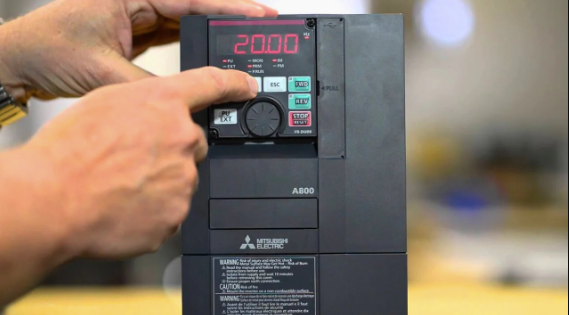
Variable Frequency Drives (VFDs) are crucial components in CNC machines, controlling the speed and torque of spindle motors with precision. However, like any electronic device, VFDs can display fault codes when problems occur. Understanding these VFD fault codes is essential for operators and maintenance engineers to quickly diagnose issues, prevent damage, and maintain smooth CNC operation.
Proper interpretation of fault codes ensures minimal downtime, protects the spindle motor, and improves overall machine reliability.
What Are VFD Fault Codes?
VFD fault codes are error messages generated by the drive to indicate abnormal conditions or operational issues. Each code corresponds to a specific problem, such as electrical faults, thermal overload, communication errors, or mechanical issues with the motor. These codes help technicians identify the root cause of the problem quickly.
Common types of VFD fault codes include:
- Overcurrent Fault (OC): Indicates excessive current draw from the motor
- Overvoltage Fault (OV): Caused by voltage spikes or regenerative braking issues
- Undervoltage Fault (UV): Low input voltage affecting VFD operation
- Overtemperature Fault (OT): VFD or motor overheating
- Communication Fault (CF): Errors in communication between VFD and CNC controller
- Motor Stall or Overload (OL): Mechanical resistance preventing normal operation
Causes of VFD Fault Codes
Electrical Issues
Voltage spikes, phase loss, or poor wiring can trigger overvoltage or undervoltage faults.
Motor Problems
Worn bearings, misalignment, or mechanical blockage can cause overload or stall errors.
Thermal Overload
Insufficient cooling, high ambient VFD fault codes temperatures, or continuous heavy load can generate overtemperature faults.
See also: How Consumer Tech Shapes Buying Behavior
Communication Errors
Faults may occur when the CNC controller loses communication with the VFD due to wiring issues or protocol mismatches.
Incorrect Parameters
Incorrect configuration or programming in the VFD settings can result in repeated fault codes.
Troubleshooting VFD Fault Codes
Step 1: Identify the Fault Code
- Check the VFD display for the exact code
- Refer to the manufacturer’s manual for code description and possible causes
Step 2: Inspect Electrical Supply
- Verify input voltage and phase connections
- Check for loose or damaged wiring
- Ensure proper grounding of the VFD
Step 3: Examine the Motor
- Inspect bearings, shaft alignment, and couplings
- Check for mechanical obstruction or excessive load
- Test motor insulation resistance
Step 4: Check VFD Cooling and Environment
- Ensure cooling fans are operational
- Maintain clean and ventilated VFD installation
- Monitor ambient temperature near the VFD
Step 5: Verify VFD Settings
- Review speed, acceleration, and torque parameters
- Reset to factory settings if necessary
- Update firmware if available and applicable
Step 6: Clear Fault and Test
- Clear the fault code using the VFD interface
- Restart the drive and test operation under controlled load
- Monitor for recurrence of the fault
Preventive Measures
- Implement regular maintenance of VFD and spindle motor
- Keep the environment clean, dry, and well-ventilated
- Avoid sudden load changes or overload conditions
- Ensure correct wiring, grounding, and parameter settings
- Use surge protectors or power conditioning equipment if needed
Benefits of Understanding VFD Fault Codes
- Rapid Diagnosis: Quickly identify and resolve issues
- Reduced Downtime: Minimize machine stoppage and production loss
- Enhanced Equipment Life: Prevent damage to VFDs and motors
- Improved Safety: Avoid hazardous conditions caused by electrical faults
- Optimized Performance: Maintain consistent spindle speed and machining quality
Conclusion
VFD fault codes are an important diagnostic tool for CNC machines, providing insights into electrical, mechanical, or operational issues. By understanding these codes, maintenance teams can troubleshoot effectively, prevent prolonged downtime, and protect both the spindle motor and the drive.
Regular maintenance, proper configuration, and timely response to fault codes are essential for smooth and reliable CNC operations.
Frequently Asked Questions
What is a VFD fault code?
A VFD fault code is an error message generated by the drive to indicate abnormal conditions affecting the motor or system.
How do I know what the code means?
Refer to the VFD manufacturer’s manual, which provides descriptions and recommended actions for each code.
Can a VFD fault damage the motor?
Yes, unresolved faults like overcurrent or overtemperature can damage the spindle motor if not addressed promptly.
How can VFD faults be prevented?
Maintain proper wiring, cooling, parameter settings, and prevent mechanical overload on the motor.
What should I do if a fault keeps recurring?
Check for underlying issues such as motor wear, electrical supply problems, or incorrect VFD configuration and repair before restarting.